Showing posts with label Professional Relationships. Show all posts

Friday, 1 May 2020

Computational Thinking


Empowered: Pedagogy & Kaupapa


Presenter: Dorothy Burt

It's NOT just a tool!


Digital learning needs to transform the way we learn, it needs to offer new experiences and empower learners, teachers and whanau.

Dorothy talked about the challenges for low income families and the statistics gathered about low decile learners.  
Below are some sobering statistics:
  • The mean academic level of new entrant students is they come in at a level of a three year old.
  • These young learners have 32 million less spoken words than a decile 10 school.  (It doesn't matter whether they speak Maori, Tongan, Hindu, Spanish)
  • 1/3 of the children change school every year.
  • 50% of students change schools where there are new government housing developments.

The Future of Technology & What it Means to Our Tamariki

Presenter: Gerald Vermeulen

Gerald focused on looking into the future.  
According to Bill Gates these are the 10 breakthrough  technologies.  These technologies were amazing, the skill and expertise with developing and programming.  Manaiakalani programme enables our young learners to develop skills and their own digital kete so they are not just participants but they have many opportunities to be creative and reflective programmers, users and confident cybersafe citizens.  Who knows what our students will become... its exciting!

10 BREAKTHROUGH TECHNOLOGIES
… according to Bill Gates


The New Digital Technologies Curriculum 2020

Presenter: Kerry Boyd Preece

Kerry talked about the new digital technologies curriculum, discussing the  new technologies in this curriculum and clarifying key points.  I definitely need to reread this presentation and familiarize myself with using the digital language.

Explore: Coding

Computational thinking and the Digital Technology Curriculum 

Presenter: Gerhard Vermeulen

Gerald's presentation gave me the opportunity to explore different coding games and attempt to some very simple coding.
Minecraft Coding Game
Breaking into small Google Meets was an excellent opportunity to practise basic coding.  I chose the Minecraft coding game which you can view on the link above.  I found this very easy to use.  There was no problems loading the game or using the coding tools and you get instant gratification.  For a first time user I was very chuffed with myself.

Now the 'Mihi Maker' coding game was not a great experience.  Initially I was so excited about the prospect of embedding this coding game in my blog but unfortunately I ended up feeling tired and exhausted.

Coding was at times very frustrating especially the coding game 'Mihi Maker' at times it froze then my computer got stuck with uploading a photo of myself that was too large.  On saying that according to the specifications on this game the photo was within the specifications.  Then I had difficulty publishing and embedding my animated mihi.  But unfortunately I still have a lot to learn as my mihi is not animated.  In fact you can't see view any of my mihi!


I am now in the final days of my professional development with the Manaiakalani facilitators, and it's time to revise and practise all the skills I have learnt.  My learning goal this week will be to do lots of deep dives and rewindable learning so I become more proficient and confident with Google sheets, and screencastify.


Monday, 27 April 2020

Devices

Devices

The focus for this Manaiakalani professional development meet was devices.  Identifying the devices used and orienting my way around these devices. Throughout this professional development learning activities and presentations the Manaiakalani facilitators modelled and talked about 'kawa of care' the kaupapa of Manaiakalani - 'Learn, Create, Share.'

Being Cybersmart

Presenter: Fiona Grant

Fiona talked about empowering our learners so they can be connected and confident decisions makers.  The focus for all educations is to model positive language and encourage and expect our learners to use positive language in their digital communication.  Fiona stated that Google is focusing and modelling through their sites and presentation on how to have a positive digital footprint.
The Manaiakalani team have structure the cybersmart curriculum programme into three categories.  This programme is repeated every year.
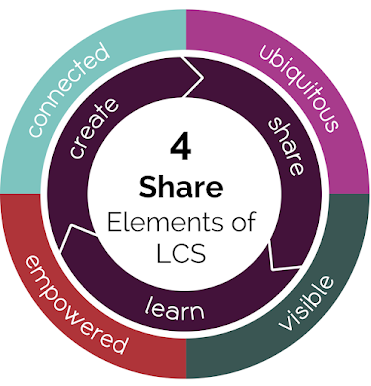
Term 1: Smart Learners (Our LEARN term)

Term 2: Smart Footprint (Our CREATE term)

Term 3: Smart Relationships (Our SHARE term)

I have a link to Fiona's presentation which I would highly recommend as essential viewing for all educators.

Hapara      

Presentator: Dorothy Burt

Hapara was created by an amazingly clever Polish man Jan Zawadzki, he designed this programme specifically for the Manaiakalani programme.  The Hapara programme enables teachers to teach and monitor their students.  Teachers can monitor all students' learning, their blogs and how many people have blogged, cybersmart security notifying the teacher and leadership of students that are in sites not recommended or have attempted to go into unauthorized sites.
Here are some of the advantages of using this programme -
  • Visible learning - access, manage and view learnerswork
  • Create differential learning
  • Keep learners safe online and focused
  • Make data driven decisions

Chromebook and i-pad simulator 

Presenter: Gerald Vermeulen

With this presentation I had the opportunity to familiarize myself with using an ipad and chromebook.   Using the online simulators was an interesting and at times frustrating because the simulator was small and tricky to label the icons and keys.  I can definitely visual how a teacher could use it within a classroom, casting the screen and showing the students the keys and icons.

Here is a screenshot of taking a digital photo and using the digital drawing tools to draw an ipad.


Here is a link to Gerald's Manaiakalani ipad presentation, this also explains how junior teachers use the éxplain everything' digital programme.  This programme is interactive, screencasting whiteboard enabling both teacher and learner to create and share learning. There are also some examples of teachers designing learning for junior students.


Screencastify

Presenter: Maria Krausse

I was really excited to learn about screencastify as I can see so learning and sharing possibilities both for educators and within my role 'Learning Support Coordinator.'  
Here are the links to install screencastify and a guide on how to use screencastify.
I can see using this for shared stories, lessons, instructions and guides for educations, students and whanau.  the beautify of this programme is you can record, edit and share all your videos.  It is important that the basic screencastify only allows five minute videos - but on the positive it is a free download.  For a price you can get the screencastify extension that you have to pay but it has unlimited video recordings.  This programme makes the learning VISIBLE and REWINDABLE.


This is my first attempt using Screencastify to review a Manaiakalani resource titled 'Smart Teacher' and embedding the recording.


This is another way I presented my screencastify using the Google slides.


Blogging Tips

Presenter: Kerry Boyde-Preece

Kerry demonstrated how to go into the comment settings and how to be cybersmart with quality blog comments.  I must admit this presentation was very fast and I will need to revisit Kerry's presentation in order to use the tips and gain a greater understanding.
This is the link to blogging tips.

Phew another empowering and very interesting online professional development Google meet with the Manaiakalani facilitators.


Friday, 27 March 2020

On-LIne Manaiakalani Professional Development


Share Tohatoha

Welcome
Today was an exciting day, I was learning online under the guidance of the Manaiakalani presenters.  I was feeling a bit apprehensive ... What if I can't join the meet or follow the instructions.  These are all thoughts and feelings that our students would be experiencing.  It was great to be connected through Google Meet, to visually see everyone, share our learning and instantly receive feedback!

Pedagogy 

Sharing has completing changed over the centuries from talking on a one to one basis, writing letters to family and friends and waiting eagerly for the arrival of the post. To the introduction in 2005 of Facebook, Bebo, You Tube, Twitter.  This transformed sharing to a much wider audience - THE WORLD IS OUR PLATFORM!

Manaiakalani focus' was to raise the achievement outcomes of young people specifically those who were disadvantaged e.g. isolation, poverty.

Sharing must have a purpose and needs an authentic audience!  Dorothy Burt stated, 'who choose to listen to you.''

Blogger Icon | Google Play Iconset | Marcus RobertoIt was very interesting to hear Maniakalani's story ... why they selected Blogger?
  • Blogger is the main online space for young people to share.
  • It resembles spaces our people want to be on.
  • Able to provide this legally, systematically and securely.
  • No sign in required for G-suite users.
  • Largest audience reach via Google.
  • Multi-purposed.
  • Can be used by learners and teachers.
  • Guaranteed three check.
  • Kids (under 18 years in NZ) can't sign up to Google Products.  The Board of Trustees owns the kids blogs.

My Professional Learning - Forms - Presenter Gerhard Vermeulen

I didn't even know that Google Forms existed, but within my role as Learning Support Coordinator I can definitely see myself using this digital tool.  I will be practising using forms especially with teachers across my cluster.  Another area I will be utilising this tool will be to collect data from families and the wider community.

Google MyMaps 

This presentation given by Gerhard Vermeulen was really interesting!  The ability for students to map out routes for school and family trips, mapping out distances and routes that the Maori took from Hawaiki to Aotearoa, measuring the distance of local parks and sports fields, mapping and identifying cities, countries of the Olympic Games.  The learning opportunities are immense and very exciting.  

But unfortunately I had a couple of hiccups, initially I had navigated to a view of the world in globe form, then I could locate my tools bar to insert pins images etc.  My learning goal for this week is to create a personalized map of distances between my clusters and also to create one with local landmarks of historical interest in the Tairawhiti region.

Google Sheets

Indepth presentation showing how to use Google sheets.I have had some experience using Google sheets within my role as Special Education Needs Coordinator (SENCO).  I am familiar with some of the tools.  The most useful tools I have learnt today is using autofill, find the sum and averages and creating interesting graphs.


Each time I embed a graph or image I learn something new and I can more confidence and develop my skill level.  
Another valuable and timesaving skill I learnt today was how to freeze the headings.  This has been really frustrating in my role as SENCO and will be used with the online registers in my new role as Learning Support Coordinator that are scheduled to come online sometime this year in New Zealand.


Blogger Tips-Labels 

Presenter Kerry Boyde-Preece

Thank Goodness for rewindable learning as I was nearly 'brain dead' by this stage.  I will have to go into a deep dive and rewind my learning for this presentation.  I have some labels but I definitely need to learn and add relevant labels to my blog.

Overall this day was all about sharing knowledge and learning using the digital medium Google Meet.  It was authentic and a valuable learning experience!


Vicki Swider


Thursday, 19 March 2020

It's all about the media and creating!

Google Hangout

Another day of intensive learning.  My first Google Hangout for the day was with presenter Anne Sinclair.  She discussed 'empowering children through create'.

One of the foundation goals of the Manaiakalani programme is to motivate our learners to engage with the curriculum,' it is a driver for engagement.

Our society is currently experiencing a lot of change - with the onset and pace of the Coronavirus disease.  Using Google hangout will enable us to communicate safely and effectively face to face through this online digital tool.  In my role as Learning Support Coordinator this enable me to communicate with whanau, and teachers.

Create - What is Create?  Create is a 'doing word'

Empowering through...

  • Choice
  • Developing skills
  • Building capacity

  • Scaffolding


The are ideas and activities that are novel, creative - 'playfully creative.'  All these experiences are highly metacognitive activities.

Live Streaming 

Presenter: Kent Somerville

Phew!  Kent presented how to live stream using U-Tube.  He talked about the three sides to U-Tube - consumer, create live stream and create a studio.
I will be doing a deep dive and rewinding my learning with live streaming.
Kent showed me how to create a playlist from U-tube.  This would be very valuable to have learning clips saved for quick access... e.g. mathematical concepts and strategies.  Within my role I could be sharing autism behaviours and strategies with colleagues.  

Google Drawing

Presenter: Aimee Williams

Google drawing can be use to develop students and teachers creativity with animations, drawings, mindmaps, formating and developing schoolwide reporting... the list was endless.  This digital tool can be used in all areas of role.  This would be a great tool to show a flow chart of my role and links with agencies, teachers, students and whanau.

Google Slides

Presenter: Maria Krausse
This presentation highlighted that Google slide was not just for the use of presentations.  Slides can be used to create learning experiences through animation.  Creating my own animation was at first daunting but by taking a risk I found it was a fun and rewarding learning experience.  


Thursday, 12 March 2020

So Much Learning....

Hangouts 

My first Google hangout - the presenter was Lenva Shearing from Manaiakanai programme. The focus of this hangout was talking about 'Effective Teaching'.  To be able to recognise, amplify and turbocharge - this effective practice.  Learning in a digital environment is liken to 'swimming in the digital ocean', Lenva Shearing.  


The Manaiakalani programme is evidence based progamme.    It is esssential that there is the infrastructure and pedagogy needs to be parallel in order to successfully move from an analogue to a digital world.
The learning in this lesson was in giant leaps, I can easily see Google hangouts being a very effective tool to be used in my role as 'Learning Coordinator'.  This can be used for professional conversations as well as supporting and communication with families and the wider community.   The statement ' Technology opens doors for learning' is a powerful statement and embraces face to face sharing of ideas.

Setting up a Google hangout was another essential part of my learning.  Using my Google calendar to set the time, date and inviting guests to the hangout was an effective and easy way to link everyone.

Google Keep - is effectively like a filing cabinet.  Another wonderful app from Google that I had no idea was available.  I will be using this app especially for saving links, images, readings on the web.  I can even use images that I have held on this app and drag them into Google docs.  This app will be a time-saver!

Chery Torrie one our my facilitators orientated our group around Google calendar.  I do use this in my work environment so I felt quite confident with most of the tools except I learnt about sharing and inviting colleagues calendars.  This will be valuable in my role as a learning coordinator especially as I work across three schools.  The ability to be able to coordinate a meeting or hangout will be an efficient use of my time.

Tab One was another Google app that I learnt about.  This amazing app collects all your tabs and can enable me to sort and collate them together.  I love how I can go into a 'deep dive' and rewind my learning at my own pace in order to embed this new digital tool.

Blog Comments
Blog commenting was a new experience and skill that I need to practise.  I was fortunate to practise in a small group with my peers, this is an area I need to practise!


Thursday, 5 March 2020

In the Deep End - 'The Business'

My digitial learning...

Learning about the origins of the 'Manaiakalani' - the name originated from Hawaii.

I loved learning about the Google groups with sharing and emailing.  I didn't even know that I belonged to so many groups within my school.  I will be definitely using this skill both professionally and on a personal level.

Google docs - I thought I had a handle of the docs.  But after day one I have learnt so much with shortcuts, headings, referencing and using comments.  If only I had used known about referencing earlier - what a time saver.  In the future I will be using the adding highlighting specific texts and adding comments with readings or sharing information to colleagues.

The explosure and use of different shortcuts in Google docs, Google calendar was excellent.  My challenge is practice and become proficient with using them!

I have always wanted my face on my Chrome Profile and now I have it!  I know how to add my photo - very excited about this new skill.

Organising my Google Drive - I have some homelearning to do with organising my folders.  I have learnt to create a new folder each year e.g 2020 and create new folders inside that year 2020 year folder.  I have also learnt that I need to open the folder first then click on new doc so it is immediately inside the right folder.

Creating a poster using a table grid - was a lightbulb moment.  This totally made sense.  I definitely need practice with ensuring that the text is in written in one grid space and images in the another.

Blogging is another new skill I have been learning to today and embeding the poster I made about my role into my blog.
Phew!  I have already learnt so much.  Its time to practise and use these new skills!

Tuesday, 25 February 2020

Nau mai, haere mai

Welcome to my professional learning blog.
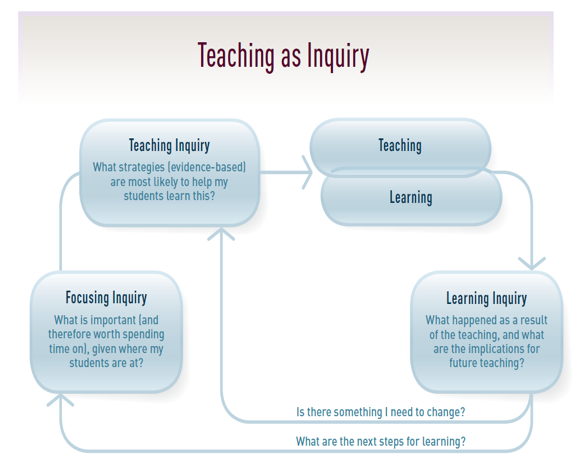
This is a place where I can reflect on my teaching in relation to my Teaching as Inquiry goals and how they link to the Education Council's Standards for the Teaching Profession